
 Deutsch
 English
 Français
 Italiano
 Türkçe
 Español
 Nederlands
 Português
 čeština
 Polski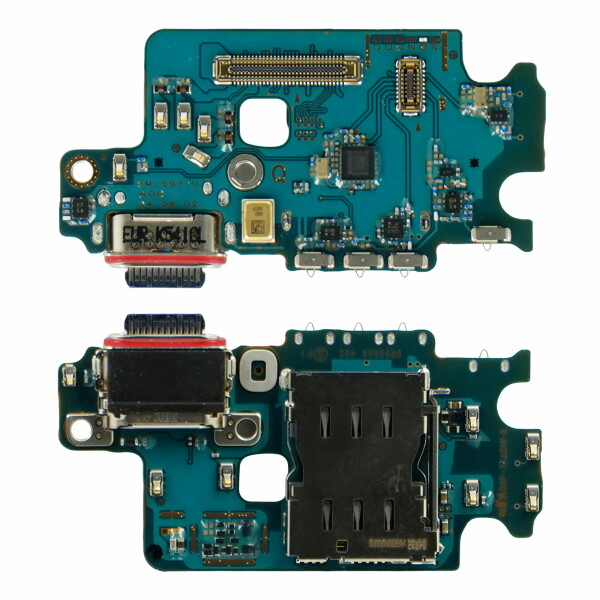
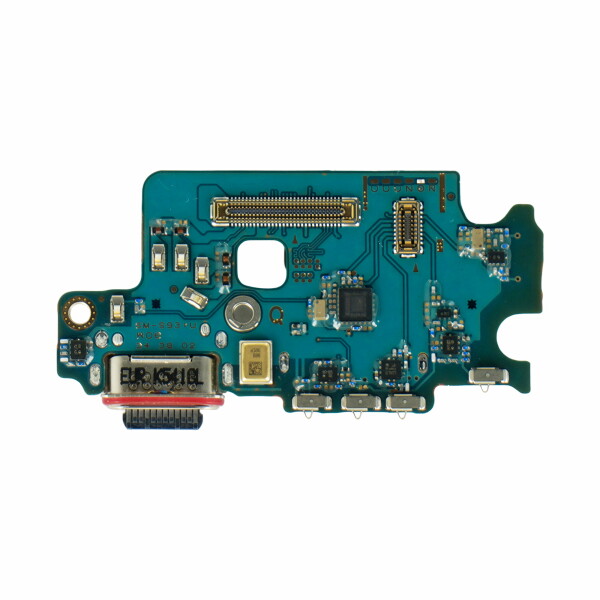
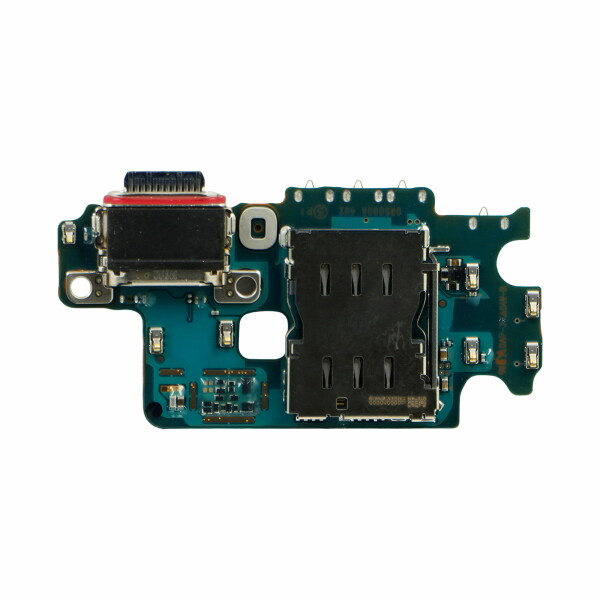


Samsung SIM Card Reader + Charging Port Flex SM-S931 Galaxy S25 GH96-18238A
Samsung original service pack part.
Samsung original service pack part.
Product information
Samsung USB-C Charging Port Board with SIM Card Reader GH96-18238A for Galaxy S25
This internal charging port board is designed for the Samsung Galaxy S25. It replaces the lower connection module containing the USB Type-C charging port, SIM card reader and integrated lower microphone.
The module is suitable for smartphone repairs where one or more of these functions are no longer working correctly. It connects to the smartphone through internal press connectors and can be installed without soldering.
Product Functions
The charging port board performs several important functions inside the smartphone. After correct installation, it supports wired charging, USB data transfer, connection to compatible USB-C accessories, SIM card recognition and voice recording through the integrated lower microphone.
- Wired battery charging through USB Type-C
- USB connection to computers and compatible devices
- Data transfer through the USB-C port
- Connection to compatible USB-C accessories
- SIM card detection and communication
- Voice input through the integrated lower microphone
Suitable for the Following Repairs
Replacing the charging port board may help restore the affected functions when the installed module is worn, damaged or no longer operating correctly.
- The smartphone does not charge through the USB-C port
- The charging connection is interrupted when the cable is moved
- The USB-C cable does not fit securely inside the port
- The device is not recognised by a computer
- USB data transfer is not working correctly
- Compatible USB-C accessories are not detected
- The SIM card is not recognised correctly
- The lower microphone does not record sound clearly
- The charging port is bent, worn or physically damaged
- The existing sub-board was damaged during a previous repair
Compatibility
- Compatible device: Samsung Galaxy S25
- Compatible model: SM-S931B / SM-S931B/DS
- Part number: GH96-18238A
- Part type: USB-C charging port sub-board
- Integrated components: Charging port, SIM card reader and lower microphone
- Connector type: USB Type-C
- Installation position: Lower section of the smartphone
Please compare the model number and the construction of the installed component before beginning the repair. Other models within the Galaxy S25 series use differently shaped charging boards and connectors.
Required Repair Tools
The following tools are commonly used when replacing the charging port board:
- SIM card eject tool
- Precision Phillips screwdriver
- Controlled heating pad, heat gun or hair dryer
- Suction cup for lifting the back cover
- Plastic opening picks
- Plastic opening tool
- Plastic spudger for disconnecting internal connectors
- ESD-safe precision tweezers
- Magnetic repair mat or screw organiser
- Isopropyl alcohol for removing adhesive residue
- Lint-free cleaning cloth
- Suitable replacement back-cover adhesive
- Suitable ESD protection
Preparation Before Installation
Switch off the smartphone completely before beginning the repair. Remove the SIM card tray and place the device on a clean, dry and well-lit working surface.
Organise all screws, brackets and internal components according to their original positions. This makes reassembly easier and helps ensure that each part is returned to the correct location.
Installation Overview
Apply controlled heat around the edges of the back cover to soften the existing adhesive. Use a suction cup and plastic opening picks to create a small opening between the back cover and the frame.
Carefully work around the edges until the back cover can be lifted. Plastic tools should be used to reduce the risk of scratching the housing or damaging internal components.
Remove the internal screws and protective covers required to access the lower section of the smartphone. Keep the screws arranged according to their original positions.
Disconnect the battery before removing or connecting the charging port board. Use a plastic spudger to release the relevant internal press connectors.
Remove the loudspeaker assembly and any additional components positioned above the charging board. The exact order should follow the internal arrangement of the device.
Carefully disconnect the main flex cable, antenna connections and other connectors attached to the charging port board. Remove the screws securing the board and lift the existing module from the housing.
Clean the installation area and remove any dust, dirt or adhesive residue. Make sure that the USB-C opening, microphone channel and SIM card area are clean and unobstructed.
Position the new charging port board inside the housing and align the USB-C connector correctly with the external opening. The board should sit flat without being forced into position.
Reconnect the internal flex cables, antenna connections and other connectors. Press each connector into place only after it has been correctly aligned.
No soldering is normally required. The charging port board is connected through its integrated press connectors and contact points.
Testing Before Reassembly
Before permanently closing the smartphone, reconnect the battery and perform a functional test of the new module.
- Connect a compatible USB-C charging cable
- Check whether the charging symbol appears
- Confirm that the charging connection remains stable
- Connect the smartphone to a computer
- Check whether the device is recognised through USB
- Test USB data transfer where required
- Insert a suitable SIM card and check network detection
- Record a short voice memo to test the lower microphone
- Make a test call and check voice transmission
- Check that the USB-C cable fits securely inside the port
After all functions have been tested successfully, switch off the smartphone and complete the reassembly. Reinstall the loudspeaker, protective covers, screws and back cover in reverse order.
Installation Recommendations
- Disconnect the battery before working on internal components
- Keep all screws organised according to their original positions
- Use plastic tools around internal connectors and flex cables
- Do not force press connectors into place
- Do not bend or damage the internal flex cables
- Keep the microphone opening clean and unobstructed
- Make sure that the USB-C port is correctly aligned with the housing
- Check that no adhesive enters the charging port or microphone channel
- Test charging, data transfer, SIM recognition and microphone function before closing the device
- Installation by an experienced repair technician is recommended
Important Product Identification
This product is the internal lower charging port board. It includes the USB Type-C charging connector, SIM card reader and lower microphone. It is not a charging cable, wall charger, battery or external SIM card tray.
Product Details
- Product: USB-C Charging Port Board with SIM Card Reader
- Part number: GH96-18238A
- Compatible device: Samsung Galaxy S25
- Compatible model: SM-S931B / SM-S931B/DS
- Connector type: USB Type-C
- Integrated components: Charging port, SIM card reader and lower microphone
- Installation type: Internal replacement component
Package Contents
- 1 x Samsung USB-C Charging Port Board with SIM Card Reader GH96-18238A for Galaxy S25
| Packing Unit: | 1 pcs |
|---|