
 Deutsch
 English
 Français
 Italiano
 Türkçe
 Español
 Nederlands
 Português
 čeština
 Polski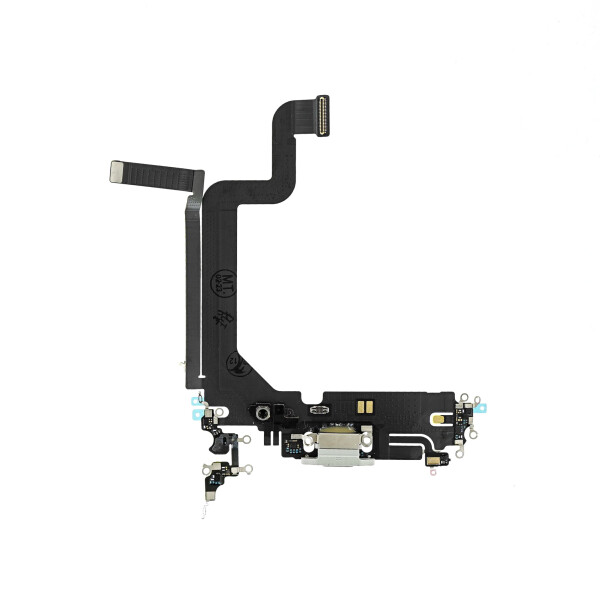
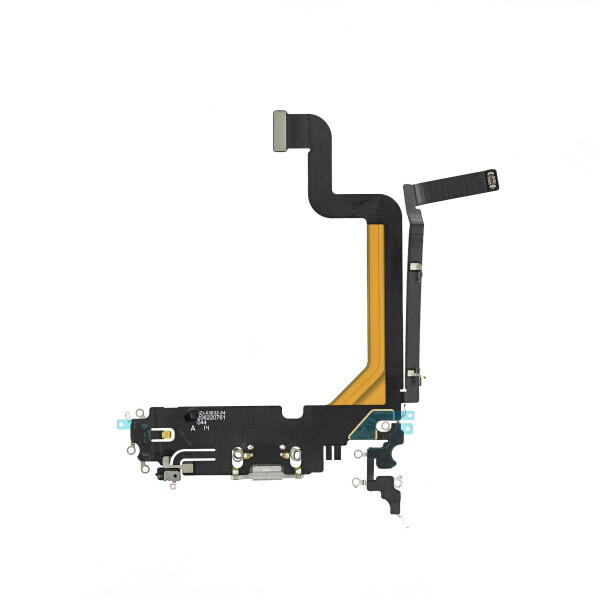


Charging Port Flex for iPhone 14 Pro Max silver
OEM Dock Lightning Flex for iPhone 14 Pro Max silver
OEM Dock Lightning Flex for iPhone 14 Pro Max silver
Product information
Charging Port Flex Cable for iPhone 14 Pro Max – Silver
This replacement charging port flex cable is designed for the Apple iPhone 14 Pro Max. It replaces the internal Lightning charging connector assembly and is suitable for smartphone repair and maintenance work.
The assembly includes the Lightning charging socket, the connecting flex cable and the required internal connectors. The silver connector frame is suitable for iPhone 14 Pro Max devices with a matching housing colour.
Product Function
The charging port flex cable connects the Lightning socket to the internal components of the smartphone. After correct installation, it supports wired charging, USB data connection and communication with compatible Lightning accessories.
The assembly is suitable for replacing a worn, damaged or defective charging connector module.
Suitable for the Following Repairs
- The charging cable does not connect securely
- The Lightning connector is loose or damaged
- Charging is interrupted when the cable is moved
- The device is not recognised by a computer
- USB data transfer is not working correctly
- The charging socket is worn, bent or physically damaged
- The existing flex cable is torn or damaged
- The connector assembly requires replacement after liquid or impact damage
Compatibility
- Compatible device: Apple iPhone 14 Pro Max
- Part type: Charging port and Lightning connector flex cable
- Connector type: Lightning
- Colour: Silver
This replacement part is specifically designed for the iPhone 14 Pro Max. The internal construction and connector positions differ between iPhone models, so the exact model should be checked before installation.
Required Repair Tools
The following tools are commonly required for replacing the charging port flex cable:
- P2 pentalobe screwdriver for the bottom housing screws
- Y000 tri-point screwdriver for internal screws
- Small Phillips screwdriver
- Suction cup for lifting the display
- Plastic opening picks
- Plastic spudger for disconnecting internal connectors
- ESD-safe precision tweezers
- Controlled heating pad or hot air tool
- Magnetic repair mat or screw organiser
- Isopropyl alcohol for removing adhesive residue
- Lint-free cleaning cloth
- Replacement display adhesive or sealing frame
- ESD protection for sensitive electronic components
Installation Overview
Before beginning the repair, switch off the iPhone completely. Remove the two pentalobe screws located next to the Lightning connector.
Apply controlled heat around the edge of the display to soften the existing adhesive. Carefully lift the display using a suction cup and plastic opening picks.
Do not insert the opening tools too deeply into the device, as sensitive flex cables and internal components are located close to the edges.
After opening the device, disconnect the battery before removing or connecting any other internal components. This helps protect the smartphone and the replacement part during installation.
Several components in the lower area of the device may need to be removed to access the charging port assembly. Keep all screws and brackets organised according to their original positions.
Disconnect the existing charging port flex cable from the internal connector. Carefully release the flex cable and charging socket from the housing without damaging the surrounding components.
Clean the installation area and remove any remaining adhesive, dust or dirt. Position the new charging port flex cable inside the housing and align the Lightning connector correctly with the opening.
The flex cable should lie flat inside the housing. It should not be folded, stretched, twisted or trapped underneath another component.
The replacement assembly is connected through its integrated flex connectors. Soldering is normally not required for the installation of the flex cable itself.
Testing Before Reassembly
The basic functions of the replacement part should be tested before the display is permanently resealed.
- Connect a compatible Lightning charging cable
- Check whether the charging symbol appears
- Confirm that the charging connection remains stable
- Connect the device to a computer
- Check whether the iPhone is recognised via USB
- Test data transfer where required
- Check that the Lightning cable fits securely inside the socket
- Test the relevant lower device functions before closing the housing
Once all required functions have been tested successfully, reinstall the removed components and close the device using suitable replacement display adhesive.
Installation Recommendations
- Disconnect the battery before working on internal components
- Keep all screws organised according to their original positions
- Do not use excessive force when disconnecting flex cables
- Do not bend, fold or crease the replacement flex cable
- Make sure that the Lightning socket is correctly aligned
- Check that no adhesive or dirt blocks the connector opening
- Test all relevant functions before permanently closing the device
- Installation by an experienced repair technician is recommended
Product Details
- Item ID: 19072
- Product: Charging Port Flex Cable
- Compatible model: Apple iPhone 14 Pro Max
- Connector type: Lightning
- Colour: Silver
- GTIN: 4067397022806
- Packaging: Bulk
Package Contents
- 1 x Charging Port Flex Cable for iPhone 14 Pro Max – Silver
| Color: | Silver |
|---|---|
| Flex Included: | Yes |
| Width Packaged: | 130.00 mm |
| Height Packaged: | 10.00 mm |
| Length Packaged: | 87.00 mm |
| Weight Packaged: | 2.00 g |