
 Deutsch
 English
 Français
 Italiano
 Türkçe
 Español
 Nederlands
 Português
 čeština
 Polski
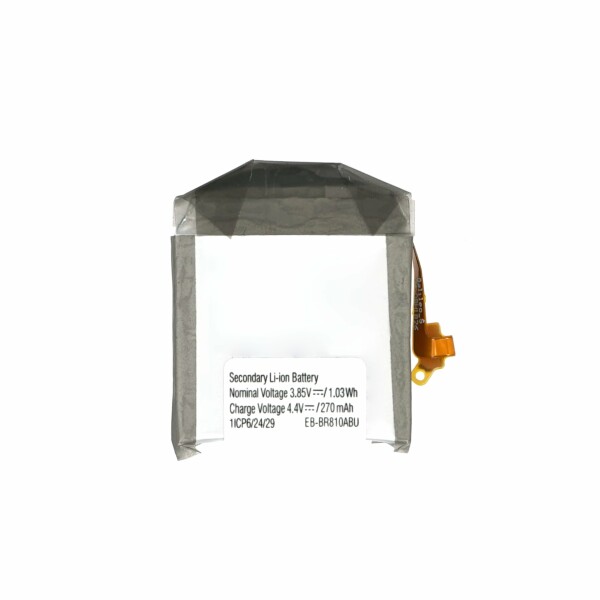


Battery EB-BR810ABU for SM-R810/SM-R815 Samsung Galaxy Watch 42mm
OEM quality battery without logo.
OEM quality battery without logo.
Product information
Compatible Battery EB-BR810ABU for Samsung Galaxy Watch 42mm
This compatible battery is designed for selected Samsung Galaxy Watch 42mm models that use the battery number EB-BR810ABU. It is suitable for replacing a worn, damaged or weak internal battery.
With a capacity of 270 mAh, a voltage of 3.85 V and an energy rating of 1.03 Wh, the battery provides a suitable power supply for compatible smartwatch models.
Suitable for Battery Replacement
Replacing the battery may help when the smartwatch has a noticeably reduced operating time or no longer charges and operates as expected.
- The battery discharges unusually quickly
- The smartwatch switches off unexpectedly
- The device only operates for a short time after charging
- The battery no longer reaches a full charge
- The smartwatch does not start reliably
- The installed battery is worn or damaged
Compatibility
- Compatible device: Samsung Galaxy Watch 42mm
- Compatible models: SM-R810 and SM-R815 series
- Battery number: EB-BR810ABU
- Capacity: 270 mAh
- Voltage: 3.85 V
- Energy: 1.03 Wh
Please compare the battery number, connector and smartwatch model before installation. Different Galaxy Watch versions and case sizes may use batteries with different dimensions and connections.
Required Repair Tools
The following tools are commonly used for replacing the internal smartwatch battery:
- Precision tri-point screwdriver
- Precision Phillips screwdriver
- Plastic opening tool
- Plastic spudger
- ESD-safe precision tweezers
- Magnetic repair mat or screw organiser
- Suitable battery adhesive
- Replacement back-cover gasket where required
- Isopropyl alcohol for removing adhesive residue
- Lint-free cleaning cloth
- Suitable ESD protection
Installation Overview
Switch off the smartwatch completely before beginning the repair. Remove the watch strap where necessary and place the device on a clean and soft working surface.
Remove the screws from the rear housing and carefully separate the back cover using a plastic opening tool. Open the device slowly, as internal flex cables may remain connected to the back cover.
Disconnect the relevant internal connectors with a plastic spudger. Remove the protective components and internal frame parts required to access the battery.
Carefully release the installed battery from its position. Avoid bending, puncturing or applying excessive pressure to the battery cell.
Remove remaining adhesive and clean the installation area. Position the new battery in the same orientation as the previous battery and align the cable and connector correctly.
Secure the battery with suitable adhesive and reconnect all internal components. Soldering is normally not required, as the battery is connected through its integrated cable and connector.
Testing Before Reassembly
Before closing the smartwatch completely, perform a basic functional test.
- Check whether the smartwatch switches on
- Place the watch on a compatible wireless charger
- Confirm that the charging symbol appears
- Check whether the battery percentage increases
- Test the touchscreen and side buttons
- Check the rear sensor functions
- Make sure that all connectors are securely attached
After successful testing, switch the smartwatch off and complete the reassembly. Make sure that no flex cable is trapped between the housing parts.
Installation Recommendations
- Keep all screws organised according to their original positions
- Use plastic tools around internal connectors
- Do not pull or fold sensitive flex cables
- Do not bend, crush or puncture the battery
- Check the back-cover gasket before closing the watch
- Test the charging function before final assembly
- Installation by an experienced repair technician is recommended
Battery Calibration
After installation, fully charge the smartwatch and use it normally. A complete charging cycle can help the device display the battery level more accurately.
Product Details
- Product: Compatible smartwatch battery
- Battery number: EB-BR810ABU
- Compatible device: Samsung Galaxy Watch 42mm
- Compatible series: SM-R810 / SM-R815
- Capacity: 270 mAh
- Voltage: 3.85 V
- Energy: 1.03 Wh
- Installation type: Internal repair component
Package Contents
- 1 x Compatible Battery EB-BR810ABU for Samsung Galaxy Watch 42mm
| Battery Chemical: | Li-Ion |
|---|---|
| Capacity: | 270 mAh |
| Battery With Logo: | No |
| Width Packaged: | 37.00 mm |
| Height Packaged: | 10.00 mm |
| Length Packaged: | 51.00 mm |
| Weight Packaged: | 2.00 g |
- Data_Sheet_15737_english.pdf Download